> For the complete documentation index, see [llms.txt](https://docs.api.market/llms.txt). Markdown versions of documentation pages are available by appending `.md` to page URLs; this page is available as [Markdown](https://docs.api.market/referral-program/how-referrals-work-and-tracking.md).
# How Referrals Work & Tracking
**Complete guide to referral flow, rewards, and partner program**
{% hint style="info" %}
💡 **New to Referrals?** Start with: [What is the Referral Program?](/referral-program/what-is-the-referral-program.md)
{% endhint %}
***
### 🔄 The Referral Flow
Here's exactly what happens when you share your referral link:
#### Step 1: You Share Your Link
Share your unique link: `https://api.market?ref=YOURCODE`
**Where to share:**
* Social media (Twitter, LinkedIn)
* Blog posts and tutorials
* Email newsletters
* Developer communities
* Direct messages
***
#### Step 2: Someone Clicks Your Link
When they click:
* ✅ Click is tracked and attributed to you
* ✅ A session cookie is set (valid for **7 days**)
* ✅ They can browse and explore the platform
***
#### Step 3: They Sign Up
When they create an account:
* ✅ They're linked to your referral code
* ✅ **$2.50 credit** is added to their wallet automatically
* ✅ Status changes to: **SIGNED\_UP**
{% hint style="warning" %}
⚠️ **Credit Validity:** The $2.50 signup bonus is valid for **30 days**. If not used, it expires.
{% endhint %}
#### Step 4: They Make a Purchase
When they subscribe to a paid API plan:
* ✅ Status changes to: **CONVERTED**
* ✅ Commission is calculated based on their spend
* ✅ Commission becomes eligible after **30 days**
***
#### Step 5: You Earn Commission
After the 30-day eligibility period:
* ✅ Commission is paid to your wallet (Basic) or referral balance (Partner)
* ✅ Transaction appears in your Ledger
### 💰 Referral Rewards & Credits
#### For Referred Users: $2.50 Signup Bonus
| Detail | Value |
| -------------- | ----------------------------- |
| **Amount** | $2.50 USD |
| **Added When** | Upon signup via referral link |
| **Validity** | 30 days from signup |
| **Usage** | Any paid API subscription |
***
#### For Referrers: Commission Structure
| Track | Commission Rate | Minimum Purchase |
| ----------- | ---------------------- | ---------------- |
| **Basic** | 5% of purchase amount | $1.00 |
| **Partner** | 10% of purchase amount | $1.00 |
**Commission Eligibility:**
* Commissions become eligible **30 days** after the purchase
* Only successful purchases (200 OK responses) count
* Refunded purchases don't generate commission
**Example:**
```
Your referral purchases a $50/month API plan
- Basic Track: $50 × 5% = $2.50 commission
- Partner Track: $50 × 10% = $5.00 commission
```
***
### 📈 Tracking Your Referrals
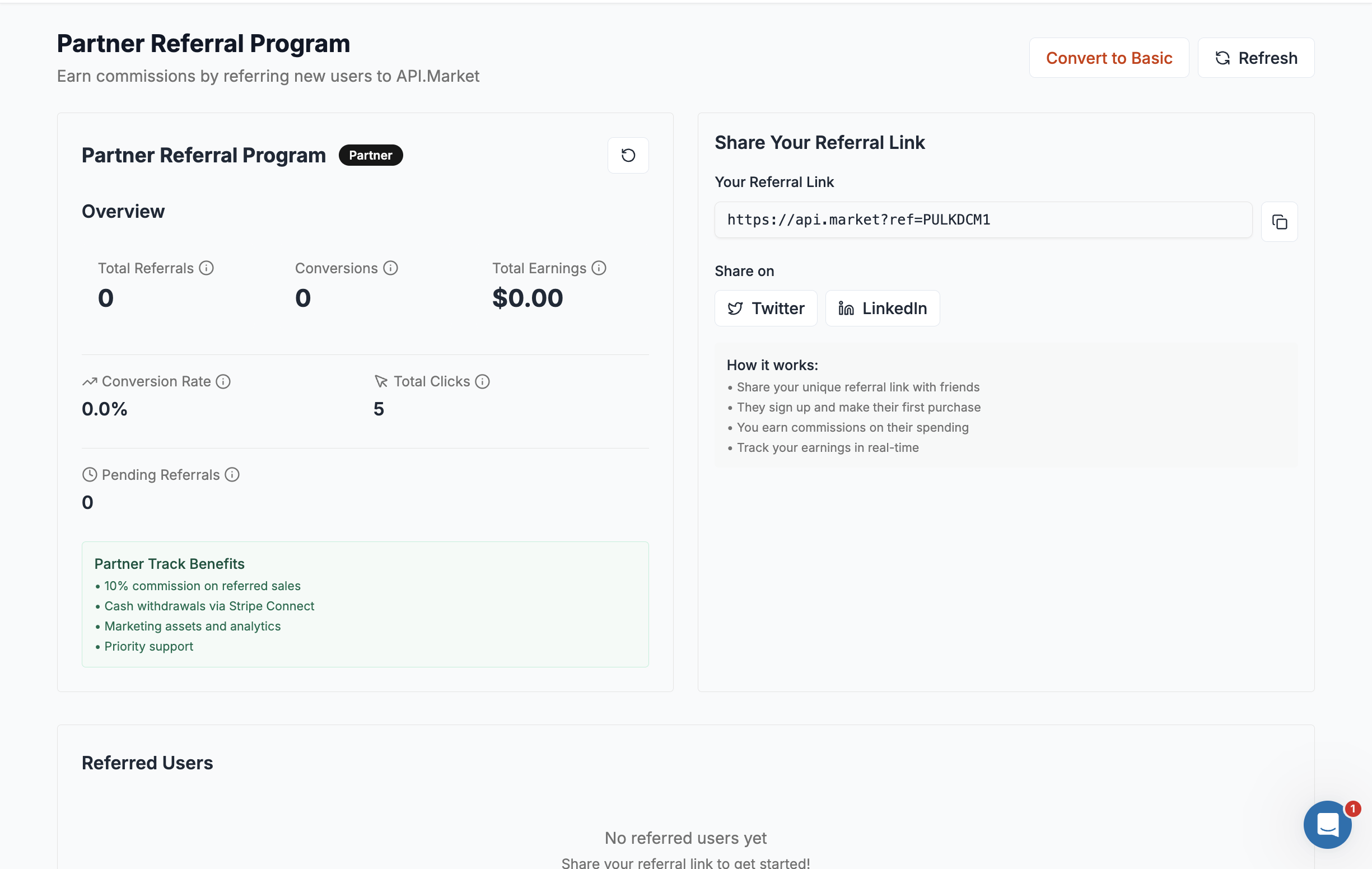
#### Referral Stats Card
**Key Metrics:**
| Metric | Description |
| --------------------- | ---------------------------------------- |
| **Total Referrals** | Users who signed up using your link |
| **Conversions** | Referrals who made a qualifying purchase |
| **Total Earnings** | Total commission earned to date |
| **Conversion Rate** | Percentage of signups that converted |
| **Total Clicks** | Number of times your link was clicked |
| **Pending Referrals** | Signed up but haven't purchased yet |
***
#### Referred Users Table
Track each referred user's status:
| Status | Meaning |
| ----------------- | --------------------------------------------------- |
| **Not Signed Up** | Clicked link but didn't create account |
| **Signed Up** | Created account, hasn't purchased |
| **Made a Spend** | Made a qualifying purchase (you earned commission!) |
***
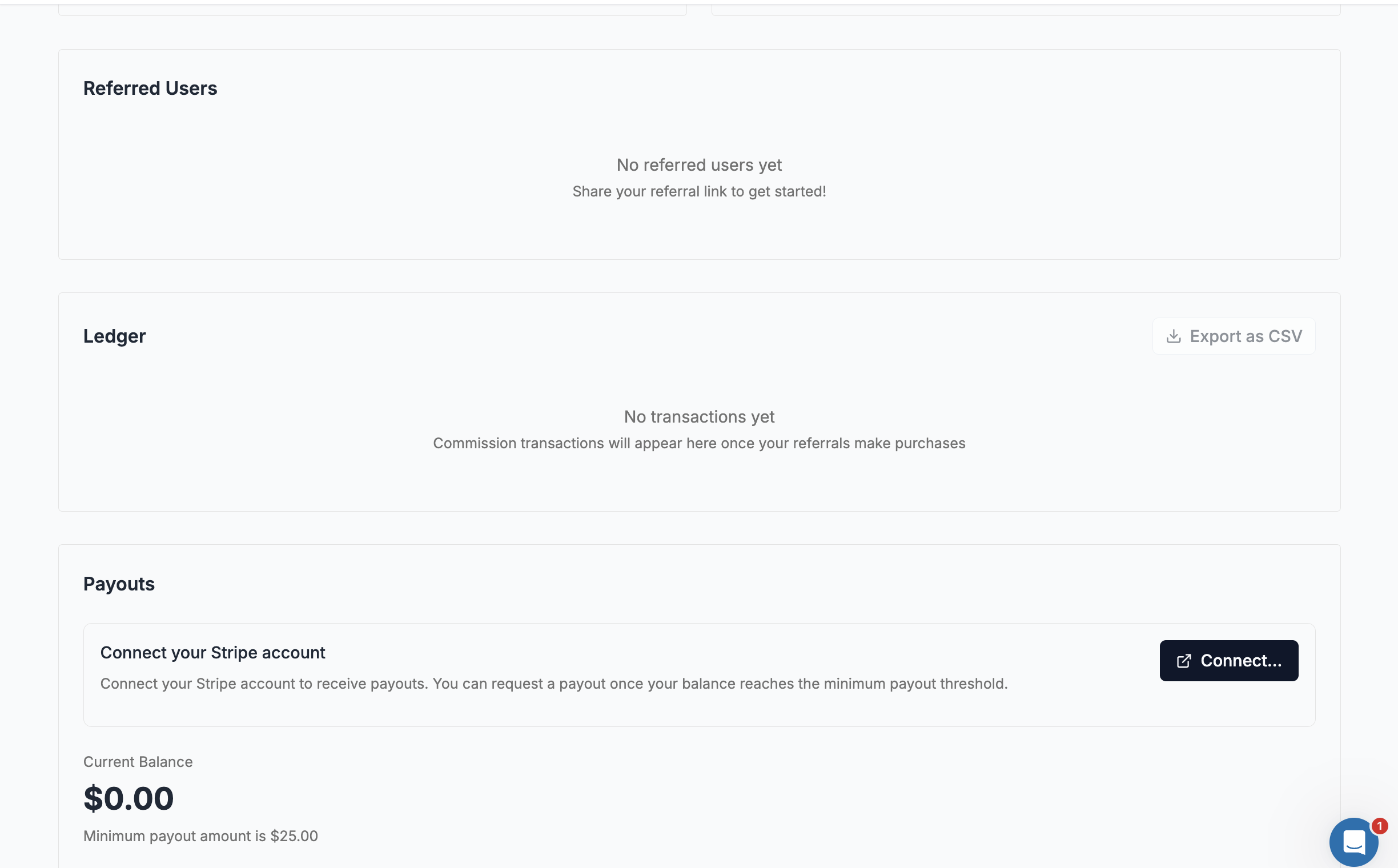
#### Referral Ledger
View all your commission transactions:
**Columns:**
* **Date** - When commission was earned
* **User Email** - Referred user's email
* **Commission Earned** - Your commission amount
* **Status** - PENDING, ELIGIBLE, PAID
**Features:**
* Export to CSV for your records
* Filter and track earnings over time
***
### 🚀 Partner Program
Upgrade to Partner for higher commissions and cash payouts.
#### How to Upgrade
1. Go to **Referrals** dashboard
2. Click **"Upgrade to Partner"** button
3. Review and accept the Partner Agreement
4. Sign with your digital signature
#### Connect Stripe for Payouts
After upgrading, connect Stripe to receive cash payouts:
1. Click **"Connect Stripe"** in the Payouts section
2. Complete Stripe onboarding (enter bank details)
3. Wait for account verification
***
#### Request Payout
Once Stripe is connected and you have sufficient balance:
**Payout Requirements:**
* ✅ Stripe account connected and verified
* ✅ Minimum balance: **$25.00**
* ✅ Account ready for payouts (no missing requirements)
**Payout Timeline:**
* Processing time: **2-7 business days**
* Email confirmation sent when processed
* Stripe fees may apply
***
#### Partner Benefits Summary
| Feature | Basic | Partner |
| ----------------- | -------------- | -------------------- |
| Commission Rate | 5% | 10% |
| Earnings Location | Wallet Credits | Referral Balance |
| Cash Withdrawals | ❌ No | ✅ Yes (via Stripe) |
| Minimum Payout | N/A | $25.00 |
| Stripe Connect | N/A | Required for payouts |
***
### ❓ FAQ
**Q: How long is my referral link valid?** A: Your link is permanent. The tracking session lasts 7 days after someone clicks.
**Q: Can I refer myself?** A: No, self-referrals are not allowed.
**Q: When do I receive commissions?** A: Commissions become eligible 30 days after the referred user's purchase, then processed based on your track type.
**Q: What if my referral gets a refund?** A: Refunded purchases don't generate commissions. If commission was already paid, it may be reversed.
**Q: Can I switch back from Partner to Basic?** A: Yes, click "Convert to Basic" on your dashboard. You'll need zero balance and no pending commissions.
***
### 💡 Tips for Success
✅ **Be authentic** - Share with people who genuinely need APIs \
✅ **Target developers** - They're your best audience \
✅ **Explain the bonus** - Highlight the $2.50 signup credit \
✅ **Use social media** - Built-in Twitter/LinkedIn sharing \
✅ **Create content** - Tutorials, reviews, comparisons \
✅ **Monitor stats** - Track what's working
***
### 📖 Related Documentation
* [**What is the Referral Program?**](/referral-program/what-is-the-referral-program.md) - Getting started
* [**How to use Wallet?**](broken://pages/OOXOMbrnQlRSq5kaisVP) - Wallet credits
* [**How do I add Payment details?**](/how-do-i-add-payment-details.md) - Stripe setup
***